

 Quick start
  Download
  Manual
  How to buy
  Contact
  Sign in
 How to send an USSD Message
(USSD is available in Ozeki NG from version v2.4.4)
Unstructured Supplementary Service Data (USSD) is a technology unique
to GSM. It is a capability built into the GSM standard for support of
transmitting information over the signaling channels of the GSM network.
USSD provides session-based communication, enabling a variety of applications.
USSD is defined within the GSM standard in the documents GSM 02.90 (USSD Stage 1)
and GSM 03.90 (USSD Stage 2).
Ozeki NG SMS Gateway supports sending USSD requests over GSM Modem connections. To send an USSD request you need to send an SMS:TEXT message and you should put the USSD information into the recipient number (Figure 1).
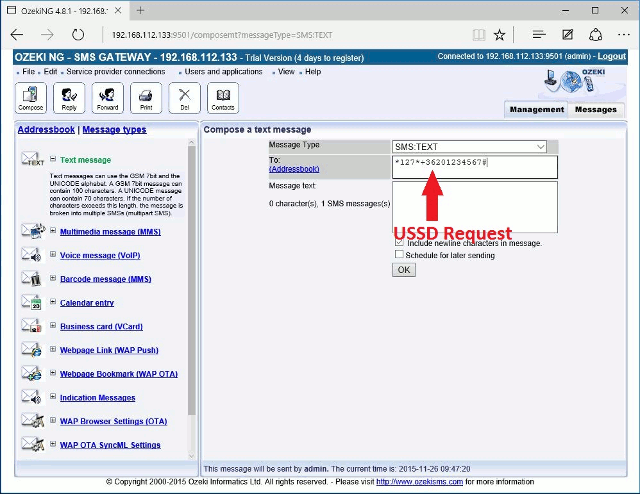
You can send USSD from the user interface and from any application for example
you can use a database server to send USSD requests. Often responses to USSD
requests are sent back by the network in an SMS message.
Additional information about USSD
USSD is instead session oriented, unlike SMS, which is a store-and-forward,
transaction-oriented technology. Turnaround response times for interactive
applications are shorter for USSD than SMS because of the session-based feature
of USSD, and because it is NOT a store and forward service. Users do not need
to access any particular phone menu to access services with USSD- they can enter
the Unstructured Supplementary Services Data (USSD) command direct from the
initial mobile phone screen.
USSD commands are routed back to the home mobile network's Home Location Register
(HLR),
allowing for the virtual home environment concept the ability for services
(based on USSD in this case) to work just as well and in exactly the same way
when users are roaming.
Unstructured Supplementary Services Data (USSD) works on all existing GSM mobile
phones.
More information
- Introduction to mobile message types
- Mobile message type specification - OTA bitmap SMS
- Mobile message type specification - Operator logo SMS, XML
- Mobile message type specification - Operator logo SMS, binary
- Mobile message type specification - Ringtone SMS
- Mobile message type specification - WAP Push SMS
- Mobile message type specification - Binary SMS XML
- Mobile message type specification - VCard SMS
- Mobile message type specification - VCalendar SMS
- Introduction to SMS Message Indication
- Mobile message type specification - Webpage link, SMS
- Multimedia Message MMS
- Mobile message type specification - OTA Browser settings SMS
- Mobile message type specification - OTA SyncML settings SMS
- Mobile message type specification
- How to send an USSD Message
- Mobile message type specification - WAP Push SL SMS
- Mobile message type specification - Picture message