

 Quick start
  Download
  Manual
  How to buy
  Contact
  Sign in
 Configure Ozeki NG SMS Gateway for high performance
This guide gives information on how you can configure Ozeki NG SMS Gateway for high performance operation. It explains what features take up server resources and how you can disable these features. After applying the settings on this page, you can check your system performance by following the instructions on the "Testing a high performance SQL to SMS configuration on your LAN" page.
Introduction
Ozeki NG SMS Gateway can be used in various environments, where different requirements are set. To satisfy the needs of customers the software includes many features. Some of these features provide functionality at the cost of performance. To build a high performance system, we explain these features so you can decide whether they are important for you or would you trade them in for performance.
Task #1 - Turn off detailed logging
Detailed log files help in resolving problems and, help in tracking messages one by one. In low throughput systems, and during initial configuration of SMSC connections, it is very useful to have detailed logs. For high performance systems, when several hundreds of messages are sent per second, writing of logs to disk can slow down the system, due to the large amount of disk IO.
To build a high performance system, please disable logging on the following forms:
- The service provider connection's configuration, form (e.g.: SMPP config form)
- The user's or application's configuration form (e.g.: Database user config form)
- The server preferences form
Task #2 - Turn off delivery report matching
When an SMS messages is submitted to the SMSC the SMSC returns a message reference (callback ID). After the message is delivered to the mobile handset the SMSC sends back a delivery report SMS, that contains the message reference of the originally submitted SMS. Ozeki NG SMS Gateway by default is configured to build a delivery report reference table, where all message references are stored. This table helps in finding the originally sent messages when a delivery report arrives. The task of pairing incoming delivery reports to submitted messages is called "delivery report matching". Delivery report matching is very convenient, however in high volume systems, where millions of messages are sent, the delivery report reference table can grow very large. This large data set can slow down delivery report matching and can put a break on system performance.
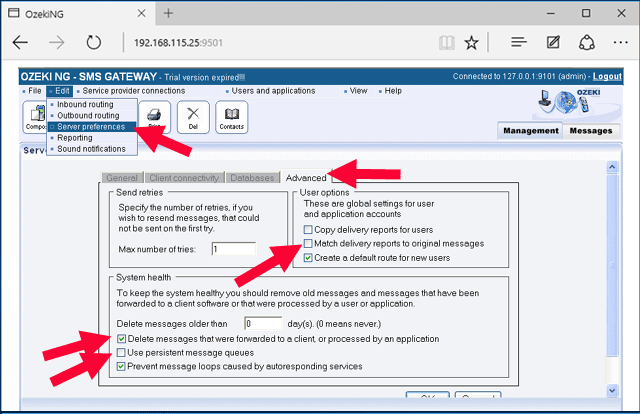
To build a high performance system, please disable delivery report matching! You can do this by opening the "Server preferences form", then clicking on the "Advanced tab". On this tab, you need to make sure the "Match delivery reports to original messages" checkbox is NOT checked.
Task #3 - Turn off persistent message queues
If messages in the Ozeki NG SMS Gateway engine are stored on the disk instead of memory, a lot of disk I/O is required to keep the data updated. The advantage to storing messages on the disk comes on power failures. If the power is lost the gateway can start from where it left off. If messages are stored in memory, in case of power failure, they need to be resubmitted.
For high capacity systems, do not use persistent message queues! To achieve this open the "Advanced" Tab of the server preferences form and uncheck the "Use persistent message queues" checkbox!
Task #4 - Remove processed messages from the system automatically
On smaller capacity systems, the system administrator might want to browse older messages in the Graphical User Interface. To support this requirement Ozeki NG SMS Gateway stores the messages in the disk for later browsing. If the number of messages increases browsing becomes difficult and large message queues can slow down the system.
To keep a high performance system healthy, you need to remove processed messages from the system automatically. To achieve this open the "Advanced" Tab of the server preferences form and check the "Delete messages that were forwarded to a client, or processed by an application" checkbox.
Screenshot of the server preferences form
If you system is configured to high performance the advanced tab of the server preferences form will look like this:
More information