
Connect your phone to the PC with Bluetooth (BT)
You can attach your phone to your PC to send and receive SMS messages using a Bluetooth (BT) connection. The Bluetooth technology is based on radio signals. Accordingly, this connection is wireless.
A major advantage of Bluetooth compared to infrared connections is that no line of sight is required. If you have a bluetooth phone within range of your PC, it can be used to send and receive SMS messages. One problem with Bluetooth, however, is that several devices can be within range and a rather complicated pairing process is required when you establish the connection.
The Bluetooth standard provides many services. Among these services there is a Bluetooth serial connection service. To use Bluetooth on your computer, it must be equipped with a bluetooth antenna. In most cases, Bluetooth antennas are connected to the USB port of your PC. When you install the driver of a bluetooth antenna, it will register "virtual" serial ports called COM3, COM4, COM5, etc. When a bluetooth-capable mobile phone is attached, it can be accessed through one of these virtual serial ports.
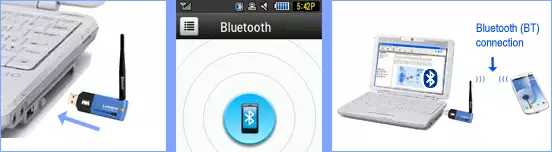
To sum it up:
In order to use the Bluetooth
connection, a PC must have Bluetooth support. This can be achieved with an USB
bluetooth antenna and an appropriate driver installation. The mobile phone
must be Bluetooth-capable and the Bluetooth link must be activated.
Following this, the serial connection can be initiated from the PC by opening
the appropriate virtual COM port (see Figure 1 above).
More information