Search the manual:

Overview Quick start Download Manual How to buy FAQ Contact Us
OZEKI NG SMS Gateway - Product Guide

Outlook Spy Contents | SearchSender address

Home > Product Manual > User Guide > Configuration > Source routing

SMS Gateway SMS Gateway Home

  Product Manual
  Introduction
  SMS technology
  Installation Guide
  User Guide
  Quick Start Guide
  User Interface
  Configuration
  Inbound Routing
  Outbound routing
  SQL logging
  Source routing
  Sender address
  Content manipulation
  Charset handling
  Client software
  Administrator's Guide
  Developers Guide
  Examples and Solutions
  Appendix
  FAQ
  Feature list
  Commercial Information
  Search
 

Contact Us!
If you wish to get further information, do not hesitate to contact us!

E-mail: info@ozekisms.com

If you have a technical question, please submit a support request on-line.

Source routing

The software gives you the option to select which service provider connection should be used to send out an SMS message. This decision can be made at the application side if routing override is enabled.

To allow routing override please open the "Advanced tab" of the configuration form of the user and place a checkmark into the "Allow routing override" checkbox (Figure 1).
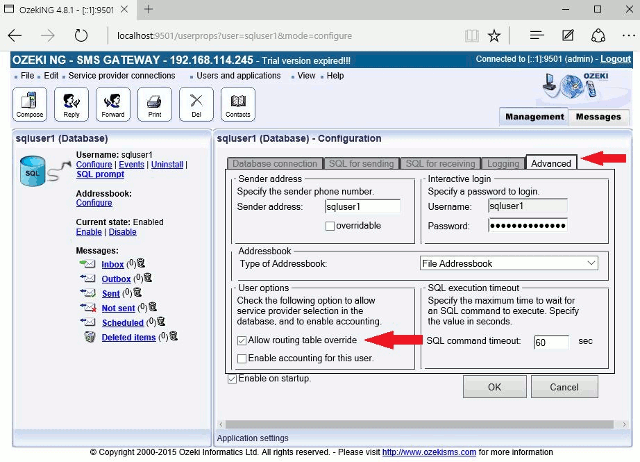

Figure 1 - Allow routing override

Related pages:


Next page: Sender address
Source: http://www.ozekisms.com/index.php?owpn=432, Word count: 386
Copyright © 2000 - 2010 Ozeki Informatics Ltd.
All rights reserved

Legal information        |         Privacy policy        |         Terms of use
Please, address your inquiries to info@ozekisms.com