Search the manual:

Overview Quick start Download Manual How to buy FAQ Contact Us
OZEKI NG SMS Gateway - Product Guide

Installation Steps Contents | SearchOracle configuration

Home > Product Manual > Installation Guide > Installation Steps > System database

SMS Gateway SMS Gateway Home

  Product Manual
  Introduction
  SMS technology
  Installation Guide
  Prerequisites
  Download Information
  Installation Steps
  System database
  Oracle configuration
  MSSQL 2008
  Import messages
  Switch from file
  HTTPS
  Service Provider Connections
  Users and applications
  Linux
  User Guide
  Developers Guide
  Examples and Solutions
  Appendix
  FAQ
  Feature list
  Commercial Information
  Search


Contact Us!
If you wish to get further information, do not hesitate to contact us!

E-mail: info@ozekisms.com

If you have a technical question, please submit a support request on-line.


Callcenter developers
If you are working on telephone solutions, please check out the Ozeki VoIP SIP SDK.
It can be used to create:

Webphone solutions:
- Adobe Flash video phone
- Silverlight video phone
- Web to web calls
- Web to VoIP calls

Custom SIP clients:
- Silverlight SIP VoIP client
- Flash SIP VoIP client
- C# .net SIP VoIP client
- ASP .net SIP VoIP client
- Web based SIP VoIP client

Custom VoIP solutions:
- VoIP SIP softphones
- VoIP call center clients
- VoIP IVR systems
- VoIP predictive dialer systems
- VoIP auto dialer systems
- VoIP call assistant
- VoIP call recording systems
- VoIP intercom solutions

System database


Storing great numbers of messages in files can slow down your system especially when messages need to be read/imported before sending. To avoid this issue you can use System Database option of Ozeki NG SMS Gateway that will store all messages in a database instead of a file. In this way you can speed up sending of great numbers of messages.

Please read how you can import messages into a database: System Database Importer

To configure System Database option go to Edit menu and select Server Preferences sub-menu in Ozeki NG SMS Gateway (Figure 1).
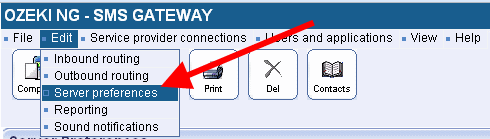

Figure 1 - Server Preferences

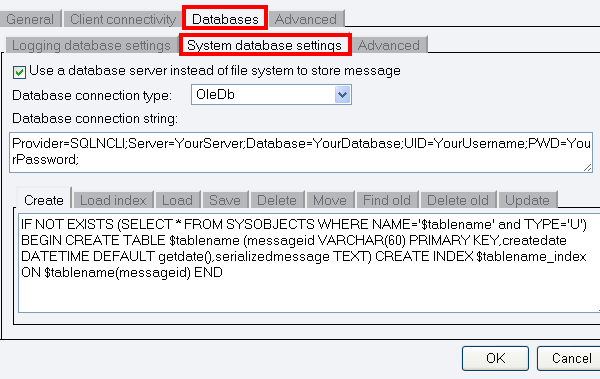
Click on Databases tab and select System database settings. Here enable Use database server instead of file system to store message option. Then specify Database connection type and Database connection string and provide the following parameters (Figure 2):
If you wish to use MySQL as the system database please configure the following SQL templates in the Server preferences form:

Create
CREATE TABLE IF NOT EXISTS $tablename (`messageid` VARCHAR(60) NOT NULL,
`createdate` DATETIME NULL,`serializedmessage` TEXT NULL,PRIMARY KEY(`messageid`));

Load index
SELECT messageid FROM $tablename

Load
SELECT messageid,serializedmessage FROM $tablename WHERE messageid IN ($idlist)

Save
INSERT INTO $tablename (messageid,createdate,serializedmessage) values ('$messageid',now(),'$serializedmessage')

Delete
DELETE FROM $tablename WHERE messageid IN ($idlist)

Move
INSERT INTO $tablename (messageid,createdate,serializedmessage) SELECT messageid,
createdate,serializedmessage FROM $sourcetable WHERE messageid IN ($idlist)

Find old

SELECT messageid FROM $tablename WHERE createdate<DATEADD(now(), INTERVAL -$maxage SECOND)

Delete old
DELETE FROM $tablename WHERE createdate<DATEADD(now(), INTERVAL -$maxage SECOND)


Figure 2 - System database settings

Please note:

When you switch to System Database, you can receive an error message since the system cannot find messages.
The reason for this: the system searches for messages still in the file but system database stores them in a database. To avoid this error message please read How to import messages into system database.

Dig deeper!
People who read this also read...


How to import messages into system database


Next page: Oracle configuration
Copyright © 2000 - 2013 Ozeki Informatics Ltd.
All rights reserved

Software PBX for Windows | VoIP SDK   |   Legal information   |   Privacy policy   |   Terms of use
Please, address your inquiries to info@ozekisms.com