
System database configuration in Oracle
In case you need to store great numbers of SMS text messages it is possible that your system will be slowed down by this number of stored files. By default, Ozeki NG SMS Gateway stores messages in files. In this way, it is highly recommended to use the System Database option in Ozeki NG SMS Gateway. This option allows you to speed up message sending. On this webpage you find a detailed configuration guide for using System Database with Oracle.
Please note!!!
When you switch to System Database, you need to restart the Ozeki NG service. After this, it is possible that you receive an error message since the system cannot find messages.
The reason for this: the system still searches for messages the file but system database stores them in a database. To avoid this error message please read How to import messages to System Database and How to switch from file to database sections.
Configuration steps
Go to Edit menu and select Server preferences menu item. Select Databases tab and click on System database settings tab. Here, enable Use a database server instead of file system to store messages. Database connection type needs to be set to OleDb.(Figure 1)
Provide your Connection string to the database. e.g.: Provider=OraOLEDB.Oracle.1;Persist Security Info=False;User ID=admin;Password=qwe123
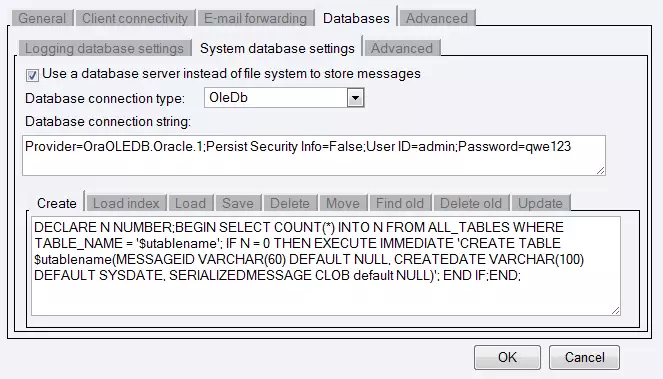
After this, provide the SQL statement for each tab:
Create tab:DECLARE N NUMBER; BEGIN SELECT COUNT(*) INTO N FROM ALL_TABLES WHERE TABLE_NAME='$utablename'; IF N = 0 THEN EXECUTE IMMEDIATE 'CREATE TABLE "$utablename" (MESSAGEID VARCHAR(60) DEFAULT NULL,CREATEDATE VARCHAR(100) DEFAULT SYSDATE,SERIALIZEDMESSAGE CLOB DEFAULT NULL)'; END IF; END;Load index tab:
SELECT MESSAGEID,SERIALIZEDMESSAGE FROM "$utablename" WHERE MESSAGEID IN ($idlist)Load tab:
SELECT MESSAGEID,SERIALIZEDMESSAGE FROM "$utablename" WHERE MESSAGEID IN ($idlist)Save tab:
DECLARE vClobVal VARCHAR2(32767) := '$serializedmessage';
BEGIN INSERT INTO "$utablename" (MESSAGEID,SERIALIZEDMESSAGE) VALUES ('$messageid',vClobVal);
END;
Delete tab:
DELETE FROM "$utablename" WHERE MESSAGEID IN ($idlist)Move tab:
INSERT INTO "$utablename" (MESSAGEID, CREATEDATE,SERIALIZEDMESSAGE) SELECT MESSAGEID,
CREATEDATE, SERIALIZEDMESSAGE FROM "$usourcetable" WHERE MESSAGEID IN ($idlist)
Find old tab:
SELECT MESSAGEID FROM "$utablename" WHERE CREATEDATE < DATEADD(second,-$maxage,getdate())Delete old tab:
DELETE FROM "$utablename" WHERE CREATEDATE < DATEADD(second,-$maxage,getdate())Update tab:
DECLARE vClobVal VARCHAR2(32767) := '$serializedmessage';
BEGIN UPDATE "$utablename" SET SERIALIZEDMESSAGE=vClobVal WHERE MESSAGEID='$messageid';
END;
More information