
How to send an USSD Message
(USSD is available in Ozeki NG from version v2.4.4)
Unstructured Supplementary Service Data (USSD) is a technology unique
to GSM. It is a capability built into the GSM standard for support of
transmitting information over the signaling channels of the GSM network.
USSD provides session-based communication, enabling a variety of applications.
USSD is defined within the GSM standard in the documents GSM 02.90 (USSD Stage 1)
GSM 03.90 (USSD Stage 2)and USSD Stage 3 (standardized in 3GPP TS 24.090).
Ozeki NG SMS Gateway supports sending USSD requests over GSM Modem connections. To send an USSD request you need to send an SMS:TEXT message and you should put the USSD information into the recipient number (Figure 1).
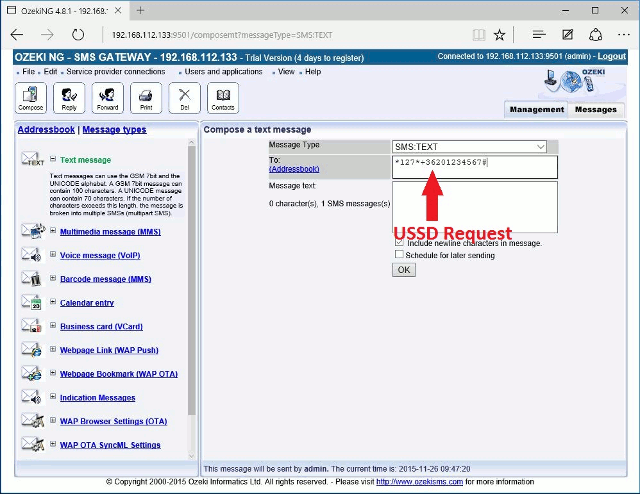
You can send USSD from the user interface and from any application for example you can use a database server to send USSD requests. Often responses to USSD requests are sent back by the network in an SMS message.
USSD commands are routed back to the home mobile network's Home Location Register (HLR), allowing for the virtual home environment concept the ability for services (based on USSD in this case) to work just as well and in exactly the same way when users are roaming. Unstructured Supplementary Services Data (USSD) works on all existing GSM mobile phones.
What is the use of USSD?
USSD can be used for:- WAP browsing
- mobile money services
- prepaid callback services
- location-based content services
- menu-based information services
- and as part of the phone's network configuration
The primary advantage of USSD messaging is that the service operates without the need for a messaging application and does not involve any costs.
Additional information about USSD
USSD is instead session oriented, unlike SMS, which is a store-and-forward, transaction-oriented technology. Turnaround response times for interactive applications are shorter for USSD than SMS because of the session-based feature of USSD, and because it is NOT a store and forward service. Users do not need to access any particular phone menu to access services with USSD- they can enter the Unstructured Supplementary Services Data (USSD) command direct from the initial mobile phone screen.